Photo rejections are one of the most common — and most avoidable — reasons UAE visa applications get delayed. The requirements are specific, the portals enforce them automatically in many cases, and a photo that works perfectly fine for a UK or Indian passport won't necessarily pass the UAE system.
This guide gives you the exact specs, explains the size discrepancy you'll find across different sources, covers what the GDRFA and ICP portals actually check, and walks through the mistakes that cause rejections most often.
Quick Reference: Dubai Visa Photo Specifications
| Specification | Requirement |
|---|
| Physical dimensions (print) | 43mm × 55mm (4.3cm × 5.5cm) |
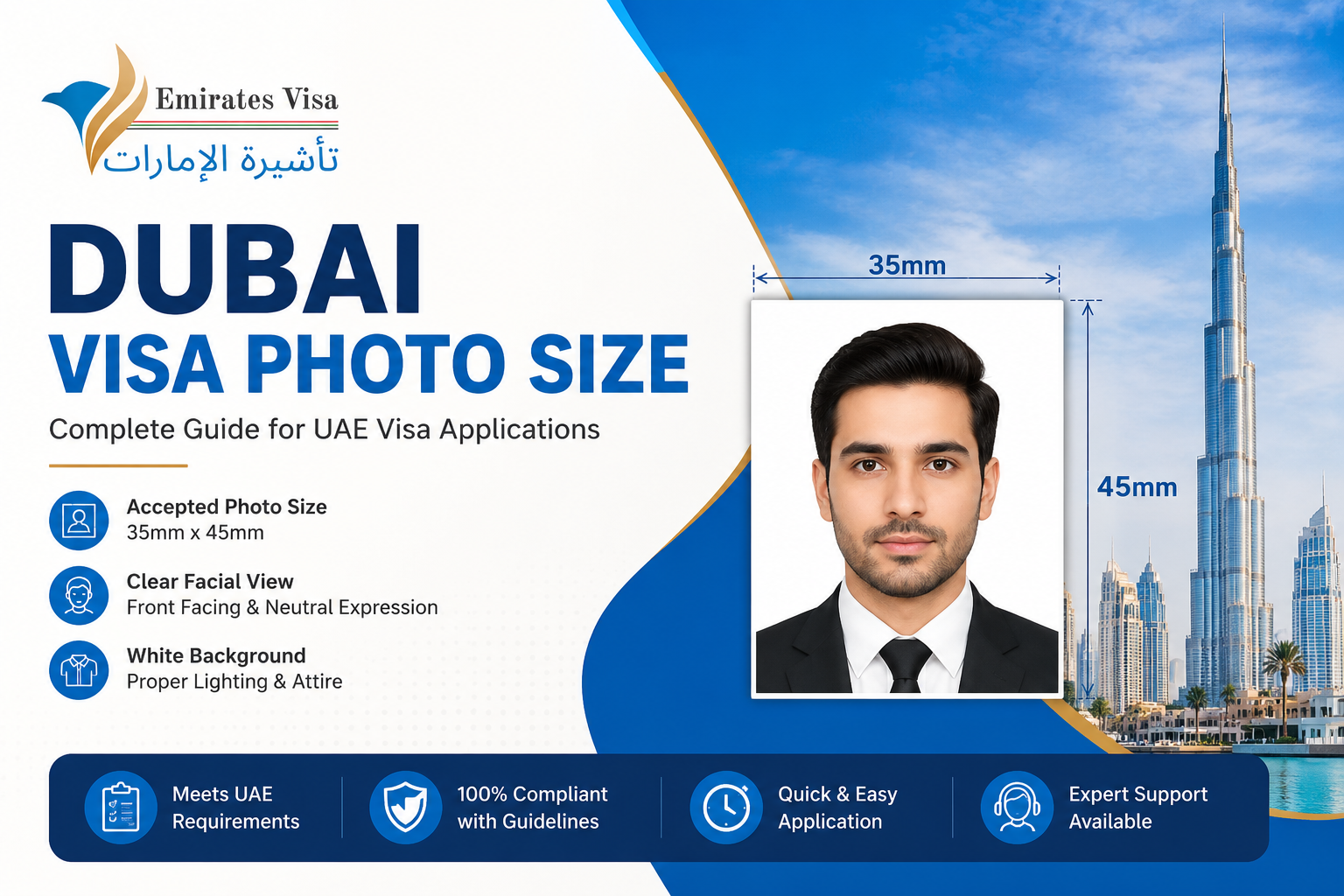
| Also accepted (print) | 35mm × 45mm (standard ICAO) |
| Digital dimensions — GDRFA portal | 300 × 369 px minimum, 200 KB – 600 KB |
| Digital dimensions — ICP portal | 1016 × 1300 px, up to 15 MB |
| Resolution | 300 DPI minimum, 600 DPI preferred |
| File format | JPEG / JPG (PNG accepted on ICP) |
| Background | Plain white only — #FFFFFF |
| Face coverage | 70–80% of the photograph |
| Face measurement (chin to crown) | 31mm – 44mm (3.1cm – 4.4cm) |
| Expression | Neutral, mouth closed |
| Glasses | Not permitted — all types |
| Photo age | Taken within the last 6 months |
| Colour mode | 24-bit true colour (no black & white) |
Portal note — GDRFA Dubai accepts 300×369 pixels at 200–600 KB. ICP Smart Services (Abu Dhabi and other emirates) requires 1016×1300 pixels at up to 15 MB. When preparing your photo, the higher-resolution version satisfies both portals.
The Size Discrepancy — Why You See Different Measurements Everywhere
If you've searched for Dubai visa photo dimensions, you've probably seen two different numbers: 43mm × 55mm and 35mm × 45mm. Both appear on reputable sites. Both are cited as "official." So which is correct?
The honest answer: both are accepted, but they're not the same thing.
43mm × 55mm is the UAE-specific visa photo size used by GDRFA Dubai and referenced in UAE visa application guidelines. It's slightly larger than a standard international passport photo.
35mm × 45mm is the ICAO biometric standard — the international baseline used for most passport photos worldwide, including the UAE Emirates ID and ICP applications. Many typing centres and photo studios will produce this size.
In practice, most GDRFA Dubai online portals accept both formats — what matters more is that the face covers 70–80% of the frame and the composition meets the quality requirements. However, if you're applying for a printed physical submission (at a consulate, Amer centre, or typing centre), the 43×55mm format is the one to request specifically for UAE visa applications.
Practical rule: Tell your photo studio "UAE visa photo" and specify 43×55mm. If you're uploading digitally, use 300×369 pixels minimum and ensure your face fills 70–80% of the frame.
Dubai Visa Photo Size in mm and cm — Print Dimensions
The standard physical Dubai visa photo dimensions:
This is larger than a standard passport photo in most countries. A UK passport photo (35×45mm), an Indian passport photo (35×45mm), or a US passport photo (51×51mm — 2×2 inches) all differ from UAE visa specifications.
GDRFA and ICP Portal Requirements — Official Specs Compared
Both portals perform automated checks on your uploaded photo. Understanding what each portal checks prevents the most common upload errors
| Check | GDRFA Dubai | ICP Smart Services |
|---|
| Portal URL | smart.gdrfad.gov.ae | icp.gov.ae or UAEICP app |
| Accepted format | JPEG / JPG | JPEG / JPG / PNG |
| Minimum pixels | 300 × 369 pixels | 1016 × 1300 pixels |
| Maximum file size | 600 KB | 15 MB |
| Background check | Automated — white only | Automated — white only |
| Face detection | 70–80% coverage enforced | 70–80% coverage enforced |
| Glasses | Auto-rejected | Auto-rejected |
| Colour | True colour only | True colour only |
If your application is submitted through Emirates Visa, your photo is reviewed against both portal requirements before submission. WhatsApp +971 588 850 205 or email support@emiratesvisa.in.
Abu Dhabi Visa Photo Size — Same Specifications as Dubai
Abu Dhabi visas and permits are processed through ICP Smart Services rather than GDRFA. However, the photo composition requirements are identical to Dubai: 43mm × 55mm print size, white background, 70–80% face coverage, neutral expression, no glasses. The only difference is the digital upload specification — ICP prefers 1016×1300 pixels at up to 15 MB, whereas GDRFA accepts 300×369 pixels at 200–600 KB.
If you are applying for a visa issued in Abu Dhabi, Sharjah, Ajman, Ras Al Khaimah, Fujairah, or Umm Al Quwain — use the ICP portal specs (1016×1300 pixels, JPEG, up to 15 MB) when preparing your digital photo file.
Dubai Visa Photo Size in Millimetres (mm)
The standard physical Dubai visa photo dimensions:
- Width: 43mm (4.3cm)
- Height: 55mm (5.5cm)
- Face from chin to crown: 31mm to 44mm
This is larger than a standard passport photo in most countries. A UK passport photo (35×45mm), an Indian passport photo (35×45mm), or a US passport photo (51×51mm — 2×2 inches) all differ from UAE visa specifications. This is one of the most common photo mistakes — applicants submit a perfectly good photo from another application that simply doesn't meet UAE dimensions.
Dubai Visa Photo Size in Pixels (Digital Applications)
For online applications through GDRFA Dubai or ICP UAE portals:
- Minimum dimensions: 300 × 369 pixels
- Preferred dimensions: 413 × 531 pixels at 300 DPI
- Resolution: 300 DPI minimum; 600 DPI preferred for biometric processing clarity
- File size: 200 KB to 600 KB for GDRFA portal uploads; up to 15 MB for ICP
- File format: JPEG (.jpg or .jpeg) — PNG is accepted on some portals but JPEG is the standard
- Colour mode: 24-bit true colour — grayscale or black-and-white images are automatically rejected
On file size: This catches people who resize photos using basic tools. A photo can have the right pixel dimensions but be over the file size limit if it's saved at high compression quality. Most image editors (including free online tools) let you export at a specific file size — aim for 300–400 KB as a target that sits safely within both portal limits.
Background Colour Requirements
The background must be plain white. Not off-white, not light grey, not cream. True white.
This matters more than most people realise. GDRFA's system performs automated background checks during digital upload. A background that looks white to the naked eye can fail if it contains a yellow cast from indoor lighting or a slight shadow from the applicant's position relative to the wall.
Specific background requirements:
- Pure white (#FFFFFF or very close to it in RGB)
- No patterns, textures, or gradients
- No shadows cast on the background — this includes shadows from the applicant's body or hair
- No objects or furniture visible in the background
- No other people or body parts visible
On clothing: Wear dark colours. A white or very light top blends into the background, which causes problems with automated face detection. Dark blue, navy, black, or any contrasting solid colour works well.
Face and Composition Requirements
This is where most DIY photos fail — not on dimensions, but on framing and composition.
Face coverage: Your face (from chin to the top of your head including hair) must fill 70–80% of the photograph. This is non-negotiable for biometric processing. A photo where the face occupies only 50% of the frame — a common result of shooting from too far away — will be flagged.
Head position: Look directly into the camera. Head must be straight, not tilted up, down, or sideways. Both ears should be symmetrically visible from the front.
Eye requirements:
- Eyes must be fully open and clearly visible
- Eyes must be looking directly at the camera — not glancing to the side
- No red-eye
- No tinted lenses or coloured contact lenses
- No glasses of any kind — UAE visa applications now require glasses to be removed. This changed; older guidance sometimes permitted glasses. Remove them.
Expression: Neutral. Mouth closed. No smiling, no frowning. The UAE's biometric facial recognition system performs better with neutral expressions, which is why the requirement exists — it's not arbitrary.
Hair: Must not obscure your face. Hairstyles that cover the forehead, cheeks, or jaw create problems. Loose hair swept back or tied works well.
Head coverings: Permitted only for religious reasons. If worn, the full face from chin to forehead and both sides of the face must remain fully visible. The head covering should ideally be dark-coloured to contrast with the white background.
Lighting Requirements
Poor lighting is the leading cause of technically compliant photos that still get rejected on quality grounds.
What good lighting looks like: Even illumination across the entire face, no shadows on either side of the nose, under the chin, or in the eye sockets. No harsh highlights that wash out facial detail.
How to achieve it at home:
- Face a window with natural daylight — daylight is the most flattering and even light source
- Don't stand with a window behind you (creates silhouette)
- Avoid direct flash — it creates shadows and can wash out skin tones
- If using artificial light, use two light sources, one on each side of your face, to eliminate directional shadows
The shadow test: Once you have a candidate photo, look at the background behind your head. Any shadow present means the photo will likely fail. Move forward from the background surface and adjust your light source position until the shadow disappears entirely.
Common Dubai Visa Photo Mistakes (And Why They Happen)
From processing experience with UAE visa applications, these are the photo issues that come up most frequently:
Wrong dimensions — submitting a 35×45mm photo without checking portal requirements The most common mistake. Many applicants use a photo from a previous visa application — often for the UK, Schengen, or India — that was taken to a different country's standard. Always take or order a photo specifically for UAE visa applications.
Background isn't truly white Indoor lighting — particularly warm incandescent bulbs or yellow LED lighting — casts a yellow-orange tint on what appears to be a white wall. The GDRFA system's automated checks flag this. Natural daylight or a photography studio with proper white backdrop eliminates the problem.
Face too small in the frame Shooting from too far away, or using too wide an angle, results in the face occupying less than 70% of the photo. The typical mistake is positioning the camera at the same distance used for a social photo — stand closer or use a higher zoom.
Glasses not removed UAE visa photo guidelines now prohibit glasses. This includes prescription glasses, reading glasses, and sunglasses. Even glasses without tinted lenses are not permitted. Applicants who've worn glasses for years sometimes don't think to remove them for the photo.
Smiling or non-neutral expression A slight smile feels natural. For biometric processing, it creates measurement inconsistencies. Keep the expression flat and neutral.
Shadow on the background Even a faint shadow visible behind the head will cause issues. Move at least 50cm from the background surface and ensure the light source isn't positioned directly above.
Photo older than 6 months Visa applications require photos that reflect your current appearance. Using a photo from a previous application — even one that meets all technical specifications — is a ground for rejection if it's more than 6 months old.
Wrong file format or size for digital upload Submitting a PNG where JPEG is required, or uploading a 3MB high-resolution file when the portal limit is 600 KB. Always check the specific portal's upload requirements before submitting.
Colour clothing that matches background White shirt or very pale top against a white background makes the automated system struggle with edge detection. This can cause the photo to fail the automated composition check.
How to Take a Compliant Photo at Home
It's entirely possible to produce a UAE visa-compliant photo at home using a smartphone, without visiting a studio. Here's the method that works:
Setup:
- Find a plain white wall. If the wall has a slight texture or pattern, hang a white sheet flat against it.
- Stand approximately 50–70cm from the wall — this prevents shadows from appearing behind you.
- Position yourself near a large window so daylight illuminates your face from the front. Morning or afternoon light (not midday sun directly overhead) works best.
Shooting:
- Ask someone to take the photo rather than using a selfie — selfie angles distort face proportions.
- Camera should be at eye level, approximately 1 to 1.5 metres from your face.
- Fill the frame so your face takes up most of the shot — from just above the top of your head to around your collarbone.
- Neutral expression, looking directly at the camera, glasses removed.
Editing:
- Use a photo editing tool or a free online UAE visa photo resizer to crop to 43×55mm and export at 300×369 pixels.
- Verify the background is true white — zoom in on the background area and check the colour values.
- Export as JPEG at around 300–400 KB file size.
- Before uploading, confirm dimensions in your file properties.
Dubai Visa Photo Dimensions for Specific Countries
The 43×55mm UAE visa photo requirement is the same regardless of where you're applying from. However, different nationalities sometimes encounter different upload interfaces on GDRFA and ICP portals. The composition and quality requirements don't change.
For Indian applicants: Indian passport photos (35×45mm) are smaller than UAE visa photo requirements. Don't reuse your Indian passport photo for a Emirates visa application — get a fresh photo taken to 43×55mm specifications. Typing centres and photo studios in India increasingly offer UAE visa photo services; specify the size explicitly.
For Pakistani applicants: Same situation. Standard Pakistani passport photos are 35×45mm. Request UAE visa photo specifications (43×55mm) explicitly.
For Filipino applicants: Philippines passport photos are 35×45mm. Order UAE visa photo size separately.
Where to Get a Dubai Visa Photo
Option 1 — Typing centres (if already in UAE) Every typing centre in Dubai and across the UAE offers visa photo services. They know GDRFA specifications. Cost: AED 15–30 for 4–6 printed photos plus a digital file. Fast and reliable.
Option 2 — Mall photo kiosks (if in UAE) Automated booths at Dubai Mall, Mall of the Emirates, Ibn Battuta Mall, and other major malls. Select the UAE visa option from the menu. Cost: AED 20–40.
Option 3 — Photography studios (UAE or home country) Professional studios offer the most control over background and lighting. Ask specifically for UAE visa photo at 43×55mm. Cost in UAE: AED 25–50. In home countries, equivalent local pricing applies.
Option 4 — Amer centres (Dubai) Government Amer centres in Dubai offer photo services alongside visa processing assistance. Convenient if you're also processing your application in person.
Option 5 — Online photo tools (from home country) Several reputable tools (Visafoto, PhotoAiD, Passport Photo Online) accept your uploaded photo and resize/reformat it to UAE visa specifications, then deliver a downloadable digital file and optional prints. Useful for applicants outside the UAE. Quality varies — verify the output meets specifications before submitting.
If using an online tool: Run the finished photo through the checklist: correct dimensions, white background (no colour cast), face coverage 70–80%, no glasses, JPEG format, file size within portal limits. Don't assume the tool has done everything correctly without checking.
Photo Requirements for Children and Infants
Every traveller needs a separate visa photo — including infants. No exceptions.
The photo specifications are the same: 43×55mm, white background, face filling 70–80% of the frame.
For infants specifically:
- Eyes do not need to be fully open for babies under 12 months
- No toys, hands, or other people visible in the photo — this is a common mistake, where a parent's hand can be seen supporting the baby
- Lay the baby on a flat white surface (a white sheet on the floor) and photograph from above — this is the easiest method for getting a compliant infant photo
- Neutral expression is ideal but not strictly enforced for very young children
For children able to sit or stand, the requirements are the same as adults. Neutral expression, looking at camera, no glasses.
Photo Requirements for Religious Head Coverings
UAE visa photo guidelines accommodate religious head coverings with specific conditions:
- Full face must be visible — from the bottom of the chin to the top of the forehead
- Both sides of the face (cheeks and jawline) must be fully visible
- No part of the face may be obscured by the covering
- Ideally dark-coloured, to contrast with the white background
Niqab and full-face coverings are not permitted in visa photos — the full facial area must be visible for biometric processing.
Conclusion
The Dubai visa photo requirement is precise but not complicated once you know exactly what's needed. The two things that trip people up most consistently are submitting a photo sized for a different country's visa (particularly a standard 35×45mm passport photo) and background lighting that creates a colour cast or shadow on what looks like a white background.
Get the size right — 43×55mm for print, 300×369 pixels minimum for digital — ensure your background is true white under good natural or studio lighting, and keep the expression neutral with glasses off. That covers the main failure points.
If you're applying through an authorised Emirates visa service provider like UAE Visa Online, your photo will typically be reviewed before submission — which catches these issues before they become a delay or rejection.
Specifications verified against GDRFA Dubai and ICP UAE portal requirements. Photo dimension standards follow ICAO biometric guidelines as applied by UAE immigration authorities. Always verify current requirements on official portals before submitting, as specifications can be updated.
 TOURIST VISA